Edit a Universal Profile
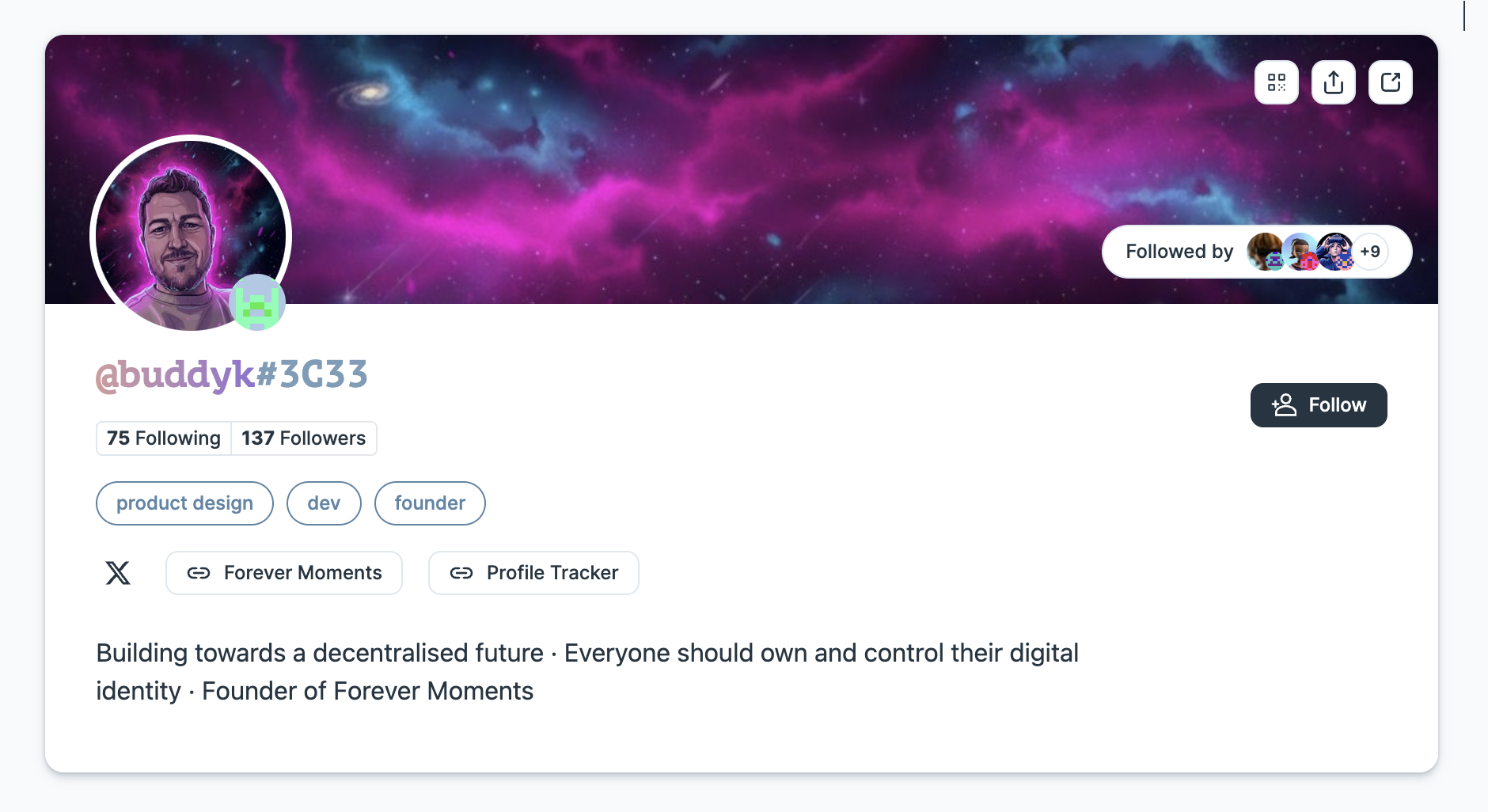
This guide will teach you how to customize your Universal Profile programmatically in JavaScript and includes:
- adding a profile and cover picture to your Universal Profile,
- editing your Universal Profile infos (e.g., description, badges, links),
- see the updated profile details and images on universaleverything.io.
To achieve this goal, we will perform the following steps:
- Create a JSON file that contains your profile details (
LSP3Profilemetadata). - Upload this JSON file to IPFS using our tools-data-providers library.
- Encode the metadata as a VerifiableURI using erc725.js.
- Set the encoded data on your Universal Profile via
setData(bytes32,bytes).
Install the dependencies
- viem + wagmi
- ethers
- web3.js
npm install wagmi viem@2.x @tanstack/react-query @erc725/erc725.js @lukso/lsp-smart-contracts @lukso/data-provider-ipfs-http-client
npm install ethers @erc725/erc725.js @lukso/lsp-smart-contracts @lukso/data-provider-ipfs-http-client
npm install web3 @erc725/erc725.js @lukso/lsp-smart-contracts @lukso/data-provider-ipfs-http-client
Create a new LSP3Profile JSON file
LSP3ProfileMetadata.json (example) - Complete "ready to use" JSON file
{
  "LSP3Profile": {
    "name": "Universal Profile - Edit Profile Data",
    "description": "Congratulations! You have successfully edited your profile!",
    "links": [
      {
        "title": "Website",
        "url": "https://mywebsite.me"
      }
    ],
    "tags": ["Public Profile"],
    "profileImage": [
      {
        "width": 640,
        "height": 609,
        "url": "ipfs://QmPCz896rcZmq8F3FuUkJinRUmPgnZGjPvZL71nAaL7Fsx",
        "verification": {
          "method": "keccak256(bytes)",
          "data": "0xe459e5769af85b09fb43bb8eaac561e196d58c0f5da3c5e150b6695898089402"
        }
      }
    ],
    "backgroundImage": [
      {
        "width": 1024,
        "height": 576,
        "url": "ipfs://QmPMmEpKnmgACsWjhDUheF8TEKpspzQhAkjbY4EBbR4jgP",
        "verification": {
          "method": "keccak256(bytes)",
          "data": "0x1c19780d377a7b01f7dcf16e0ebffd225e29d2235625009f67cf9d86a32a79e1"
        }
      }
    ]
  }
}
We will start by creating a new JSON file that will contain our LSP3Profile metadata.
{
  "LSP3Profile": {
    "name": "...", // a self chosen username
    "description": "...", // A description, describing the person, company, organisation or creator of the profile.
    "links": [
      // links related to the profile
      {
        "title": "...", // a title for the link.
        "url": "..." // the link itself
      }
      // add more links...
    ],
    "tags": ["...", "..."], // tags related to the profile
    "profileImage": [
      {
        "width": 640, // in pixels
        "height": 609, // in pixels
        "url": "ipfs://...", // IPFS image identifier (CID)
        "verification": {
          "method": "keccak256(bytes)", // do not change!
          "data": "0x..." // keccak256 hash of the image file
        }
      }
    ],
    "backgroundImage": [
      {
        "width": 1024, // in pixels
        "height": 576, // in pixels
        "url": "ipfs://...", // IPFS image identifier (CID)
        "verification": {
          "method": "keccak256(bytes)", // do not change!
          "data": "0x..." // keccak256 hash of the image file
        }
      }
    ]
  }
}
Add more details to your profile:
Add more details about the Universal Profile for the entity's name, description, links, and tags. The properties links and tags accept an array of objects or strings, so you can add as many as you need!
Be as creative as you want to make your Universal Profile as unique as possible! 🎨
The JSON file for LSP3Profile accepts an array of images so that you have pictures of different sizes and dimensions. This way, client interfaces can know which files to pick based on the container size in their interface.
Upload data to IPFS
The tools-data-providers library supports multiple providers including local IPFS nodes, Pinata, Infura, and more. Choose the one that best fits your setup.
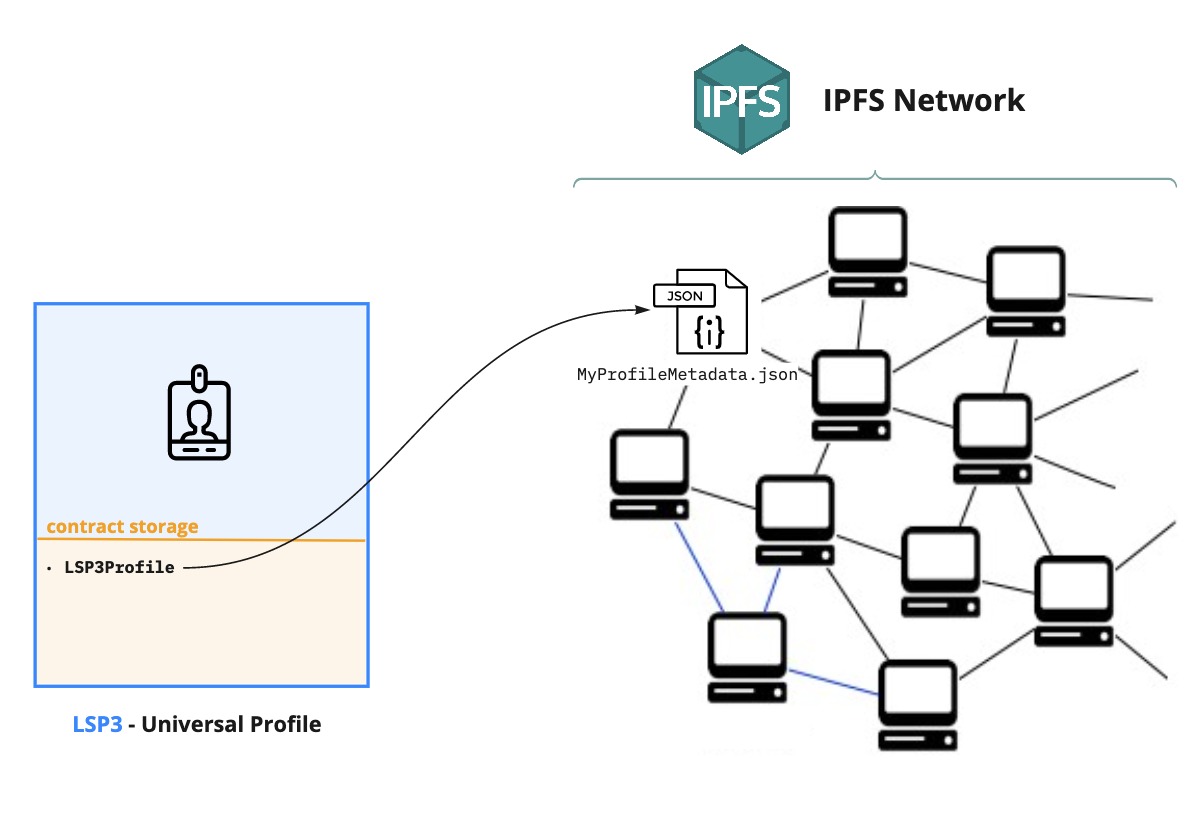
This guide will store our Universal Profile metadata on IPFS. We can edit our UP metadata by:
- Creating a new JSON file with new or updated info (☑️ done in the previous step).
- Uploading the file to IPFS.
- Change the reference of our LSP3Profile key to point to our uploaded JSON file.
Upload image to IPFS
For the properties profileImage and backgroundImage, we will need to add the following information:
verification.data: the keccak256 hash of the image fileurl: the url of the image uploaded to IPFS.
Both values can be obtained from using our IPFS library.
import { createReadStream } from 'fs';
import { IPFSHttpClientUploader } from '@lukso/data-provider-ipfs-http-client';

const provider = new IPFSHttpClientUploader(
  'https://api.pinata.cloud/pinning/pinFileToIPFS',
);
// Or use a local IPFS node: 'http://127.0.0.1:5001/api/v0/add'

const file = createReadStream('./test-image.png');

const { url, hash } = await provider.upload(file);
Image sizes should be written as numbers, not as strings. The max image widths supported by universalprofile.cloud are:
profileImage <= 800px, backgroundImage <= 1800px
Upload JSON Metadata to IPFS
Same as the image, we need to gather the url and hash values of the uploaded JSON Metadata.
import { IPFSHttpClientUploader } from '@lukso/data-provider-ipfs-http-client';
// reference to the previously created JSON file (LSP3Profile metadata)
import jsonFile from './LSP3Metadata.json';

const ipfsProvider = new IPFSHttpClientUploader(
  'https://api.pinata.cloud/pinning/pinFileToIPFS',
);
// Or use a local IPFS node: 'http://127.0.0.1:5001/api/v0/add'

async function editProfileInfo() {
  // Upload our JSON file to IPFS and retrieve url and hash values
  const { url: lsp3ProfileIPFSUrl, hash: lsp3ProfileIPFSHash } =
    await ipfsProvider.upload(jsonFile);
}
We are now ready to apply these changes to our Universal Profile. We will see how in the next section. ⬇️
Encode the LSP3Profile Metadata
The next step is to encode the data to write it on our Universal Profile ERC725Y smart contract.
We use our erc725.js library with the encodeData() function. The library provides the LSP3 schema and handles VerifiableURI encoding automatically.
You can store the LSP3Profile metadata on IPFS (off-chain) or on-chain as base64. On-chain base64 is convenient for smaller metadata but costs more gas. For profiles with many images, IPFS is more cost-effective.
There are three approaches:
- 📦 json + url (recommended)
- 📦 hash + url (manual)
- 💾 On-Chain (base64)
The simplest approach — pass the JSON object and URL, and erc725.js computes the hash for you:
import { ERC725 } from '@erc725/erc725.js';
import LSP3ProfileSchema from '@erc725/erc725.js/schemas/LSP3ProfileMetadata.json';

// Your LSP3Profile JSON (from step 1)
import lsp3ProfileJson from './LSP3Metadata.json';

// Encode the LSP3Profile data — erc725.js computes the hash automatically
const encodedData = ERC725.encodeData(
  [
    {
      keyName: 'LSP3Profile',
      value: {
        json: lsp3ProfileJson,
        url: lsp3ProfileIPFSUrl, // from IPFS upload step
      },
    },
  ],
  LSP3ProfileSchema,
);

console.log('Data Key:', encodedData.keys[0]);
console.log('Encoded Value:', encodedData.values[0]);
If you already have the hash (e.g., from the IPFS upload), you can pass it directly:
import { ERC725 } from '@erc725/erc725.js';
import LSP3ProfileSchema from '@erc725/erc725.js/schemas/LSP3ProfileMetadata.json';

const erc725 = new ERC725(LSP3ProfileSchema);

const encodedData = erc725.encodeData([
  {
    keyName: 'LSP3Profile',
    value: {
      hashFunction: 'keccak256(utf8)',
      hash: lsp3ProfileIPFSHash, // from IPFS upload step
      url: lsp3ProfileIPFSUrl,
    },
  },
]);

console.log('Data Key:', encodedData.keys[0]);
console.log('Encoded Value:', encodedData.values[0]);
For smaller profiles, you can store the entire JSON on-chain using a data: URI with base64 encoding — no IPFS needed:
import { ERC725 } from '@erc725/erc725.js';
import LSP3ProfileSchema from '@erc725/erc725.js/schemas/LSP3ProfileMetadata.json';
import { keccak256, toUtf8Bytes } from 'ethers';

// Your LSP3Profile JSON (from step 1)
import lsp3ProfileJson from './LSP3Metadata.json';

const erc725 = new ERC725(LSP3ProfileSchema);

// Convert to base64 data URI
const jsonString = JSON.stringify(lsp3ProfileJson);
const base64Content = Buffer.from(jsonString).toString('base64');
const dataUri = `data:application/json;base64,${base64Content}`;

// Hash the JSON string
const jsonHash = keccak256(toUtf8Bytes(jsonString));

const encodedData = erc725.encodeData([
  {
    keyName: 'LSP3Profile',
    value: {
      hashFunction: 'keccak256(utf8)',
      hash: jsonHash,
      url: dataUri,
    },
  },
]);

console.log('Data Key:', encodedData.keys[0]);
console.log('Encoded Value:', encodedData.values[0]);
Edit the Universal Profile
Now that our updated data is encoded, we are ready to set it in our Universal Profile smart contract. The 🆙 Universal Profile Extension handles all the transaction signing internally.
- viem + wagmi
- ethers
- web3.js
import {
  useAccount,
  useWriteContract,
  useWaitForTransactionReceipt,
} from 'wagmi';
import UniversalProfile from '@lukso/lsp-smart-contracts/artifacts/UniversalProfile.json';

function EditProfile() {
  const { address: UP_ADDRESS } = useAccount();
  const { writeContract, data: txHash } = useWriteContract();
  const { isSuccess } = useWaitForTransactionReceipt({ hash: txHash });

  async function handleEditProfile() {
    // encodedData from the previous encoding step
    writeContract({
      address: UP_ADDRESS,
      abi: UniversalProfile.abi,
      functionName: 'setData',
      args: [encodedData.keys[0], encodedData.values[0]],
    });
  }

  return (
    <button onClick={handleEditProfile}>
      {isSuccess ? '✅ Profile updated!' : 'Update Profile'}
    </button>
  );
}
import { ethers } from 'ethers';
import UniversalProfile from '@lukso/lsp-smart-contracts/artifacts/UniversalProfile.json';

// Connect via the UP Browser Extension
const provider = new ethers.BrowserProvider(window.lukso);
await provider.send('eth_requestAccounts', []);
const signer = await provider.getSigner();
const account = await signer.getAddress();

// Create instance of the Universal Profile
const universalProfileContract = new ethers.Contract(
  account, // The Universal Profile address
  UniversalProfile.abi,
  signer,
);

// Update LSP3Profile metadata on the Universal Profile
const tx = await universalProfileContract.setData(
  encodedData.keys[0],
  encodedData.values[0],
);

const receipt = await tx.wait();
console.log('✅ Profile updated! Transaction hash:', tx.hash);
import Web3 from 'web3';
import UniversalProfile from '@lukso/lsp-smart-contracts/artifacts/UniversalProfile.json';

// Connect via the UP Browser Extension
const web3 = new Web3(window.lukso);
await web3.eth.requestAccounts();
const accounts = await web3.eth.getAccounts();

// Create instance of the Universal Profile
const universalProfileContract = new web3.eth.Contract(
  UniversalProfile.abi,
  accounts[0], // The Universal Profile address
);

// Update LSP3Profile metadata on the Universal Profile
const receipt = await universalProfileContract.methods
  .setData(encodedData.keys[0], encodedData.values[0])
  .send({ from: accounts[0] });

console.log('✅ Profile updated! Transaction hash:', receipt.transactionHash);
You can validate your LSP3Profile metadata of your Universal Profile using the ERC725 Inspect Tool.
Visualize your updated Universal Profile
You can now check your Universal Profile with its updated images and descriptions on Universal Everything.
https://universaleverything.io/[UP ADDRESS]